Posts

How to support the GDPR requirements in your Sitecore solution

In the past months GDPR has been a hot topic at my clients and we have had to implement the different GDPR requirements at multiple clients. This involved not only educating everyone involved about what GDPR involves, what it means and how it should be interpreted but also how to support this in Sitecore implementations. A good starting point, that we also used is this nice stackexchange post . It gives an overview of the different touch points in Sitecore and an approach of fulfilling the requirements. This blog post tries to go one step further with some implementation examples, mainly targeted at Sitecore 8 prior to 8.2 update 7. This post does not cover all GDPR topics as some of them are more business and less implementation related, nor does it give full working code examples, but it gives a good indication on the major topics that need to be considered. This post may be updated in the coming period if I receive feedback, to make this a good and even more complete source of in...
Unwanted HTML elements in your Sitecore richtext fields

Custom save events to the rescue! I have been planning this blog for years maybe but kept postponing, but finally it is here after similar requests from our great Sitecore community. The problem I have solved in my projects in the past is the following: When editing rich text fields, the default behavior of the Sitecore Telerik control is to insert a bit too many HTML elements around your content. For example <p> tags you don't want there, <p> tags or divs around image that you embed in the rich text field etc.  At some point I was so annoyed by this and the bad HTML it produced, I decided to customize the item save event to clean up the resulting HTML. Below you will find my code, I hope you find it useful. Be aware this code has only been tested on Sitecore 7.x. While I expect it to also work for 8+, you better test for yourself whether nothing breaks. Also, extend to your own need, to create your own neat and clean HTML. /// /// Don't forget follo...

Sitecore reporting database rebuild issue

Help, I'm seeing guids in my reports! So I had this environment where my reports were missing data I was surely having in my xDB database. I double checked this. So my only conclusion was that at some point the reporting database was missing data and I needed to rebuild it. As my version is 8.2 update 5 I followed the manual from this link to the letter . Everything seemed to work ok, until I switched to the fresh reporting database and I started looking at my reports 😧 All goal names, page names etc. were displayed with their item ID guids and not there (display)names.  I checked the xhr call to the Sitecore api's and saw messages about segments not found and missing translations.  I figured ok, let's just rebuild indexes, rebuild links and hopefully things will start to work again. WRONG!! After some digging around I found out that at some point apparently my marketing definition have been redeployed setting the deploy dates of my segments to a date after many o...

FXM on Single Page Applications

Pushing route visits I had a usecase where I needed to use FXM in a non-Sitecore Single Page Application. By default, FXM only supports loading its script on page load to push a page visit to Sitecore. However, for an SPA this is not very helpful since after the initial load of the APP it only changes routes and will not push events to FXM. So to support pushing route visits from the SPA to Sitecore analytics I made some slight modifications to the standard FXM beacon script to enable the SPA to push a visit to a route to Sitecore. Of course within the SPA this needs to be supported, so the default beacon script needs to be loaded and below PushRouteEvent method called on each route visit. function PushRouteEvent(){ var xmlhttp = new XMLHttpRequest(); xmlhttp.onreadystatechange = function () { if (xmlhttp.readyState == XMLHttpRequest.DONE) { if (xmlhttp.status == 200) { document.getElementById("myDiv").inner...

EXM adventures

Afbeelding
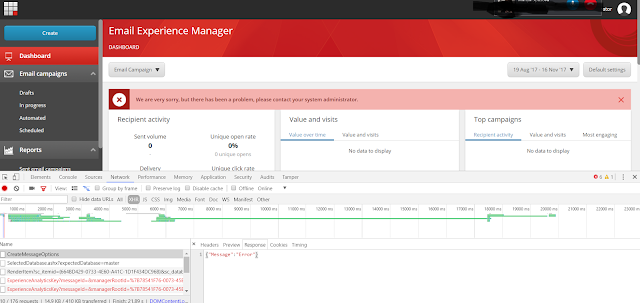
This week I ran into a strange error when integrating Sitecore EXM in our project. EXM module installed just fine and our site kept working. However, EXM did not. When ever I browsed to the EXM dashboard I would receive disturbing errors. So first step was to dig into the Sitecore logs and I found the following error: 784 08:51:06 ERROR Information about distributed session {1D855C98-4C5E-4675-A15A-1F68D219584B} could not be published to the environment. Agents will be requested to deactivate temporarily. Exception: Sitecore.ExM.Framework.Exceptions.ConnectivityException Message: Failed to store information about the session through the session data provider. Source: Sitecore.ExM.Framework at Sitecore.ExM.Framework.Distributed.Sessions.Session.PublishSessionInfo(Nullable`1 recentMaintenanceTime) at Sitecore.ExM.Framework.Distributed.Sessions.Session.OnSessionUpdateEvent() Nested Exception Exception: System.Data.SqlClient.SqlException Message: String or binary da...

Marketing setup journey (part 3 of 3) - Setting up engagement plans and bring it all together

Afbeelding
This blog is a follow up on part 2 of my marketing setup journey where I try to fulfill the following requirement: Based on custom contact data (like age category, nr of acquired products etc.) enroll contact in engagement plans and send them automatic email campaign messages and track their progress on the site after opening the email. In this last piece I show you how I setup my engagement plans and how I bring everything together from enrolling into a plan to monitoring your contact through the plan, emails and profile extensions. Create the plan For this part we are going to configure the different parts in the Marketing Control Panel and Email Experience Manager, both accessible through the Sitecore dashboard. For this part it is recommended to use IE or Edge as these parts use Silverlight, and chrome for example does not play nice with this. We start by setting up an Engagement plan that we are going to use to cover our scenario. Go to your marketing control panel....

Marketing setup journey (part 2 of 3) - Extending Experience Profile

Afbeelding
This blog is a follow up on part 1 of my marketing setup journey where I try to fulfill the following requirement: Based on custom contact data (like age category, nr of acquired products etc.) enroll contact in engagement plans and send them automatic email campaign messages and track their progress on the site after opening the email. I will explain and show in this piece what I did to extend my Sitecore eXperience Profile with custom data so that I can later on use that in engagement plans, personalization rules and A/B tests. Extending your profile template The default Sitecore experience profile contains data like: Firstname Lastname Email Gender Birthday Address etc. Disclaimer : Keep in mind that you might not want to store sensitive data in xDB as frontend databases are not considered 'safe', so consider only saving metadata. So instead of saving someone’s account balance, email address or Age, save ‘IsRich’ or something even more ‘vague’, so that i...